As Solutions Architects, our primary goal is to design systems that are secure, cost-effective, and solve a specific business problem. While Traditional Machine Learning (ML) has been part of our toolkit for years, Generative AI (Gen AI) requires a fundamental shift in how we architect data flows and governance layers.
This post explores the core components of the Gen AI stack and the patterns required to move from an “AI Experiment” to a “Production Solution.”
1. Traditional ML vs. Generative AI: The Architect’s View
The first step is knowing when to use which tool. The difference lies in whether the requirement is to categorize existing data or synthesize new information.
- Traditional ML (The Specialized Tool): Best for high-volume, repetitive tasks where accuracy and speed are paramount.
- Use Case: Predicting customer churn, fraud detection, or dynamic pricing.
- Generative AI (The General Engine): Best for handling unstructured data and complex reasoning that doesn’t have a single “correct” answer.
- Use Case: Knowledge management, document synthesis, or automated customer support.
| Metric | Traditional ML | Generative AI |
| Logic Type | Discriminative (A vs. B) | Generative (Create A from patterns) |
| Input Data | Structured (Database records) | Unstructured (PDFs, Images, Text) |
| Infrastructure | Specialized per task | General-purpose Foundation Models |
| Cost Driver | Model Training & Compute | Inference (Tokens) & Vector Storage |
2. The Standard Design Pattern: RAG
Retraining a model (Fine-Tuning) is often too expensive and slow for enterprise data. Instead, Solutions Architects use Retrieval-Augmented Generation (RAG).
The “Open Book” Analogy:
An LLM by itself is like a student taking a closed-book exam based on data from two years ago. RAG turns it into an open-book exam. We provide the “textbook” (your current enterprise data) right when the query is made.
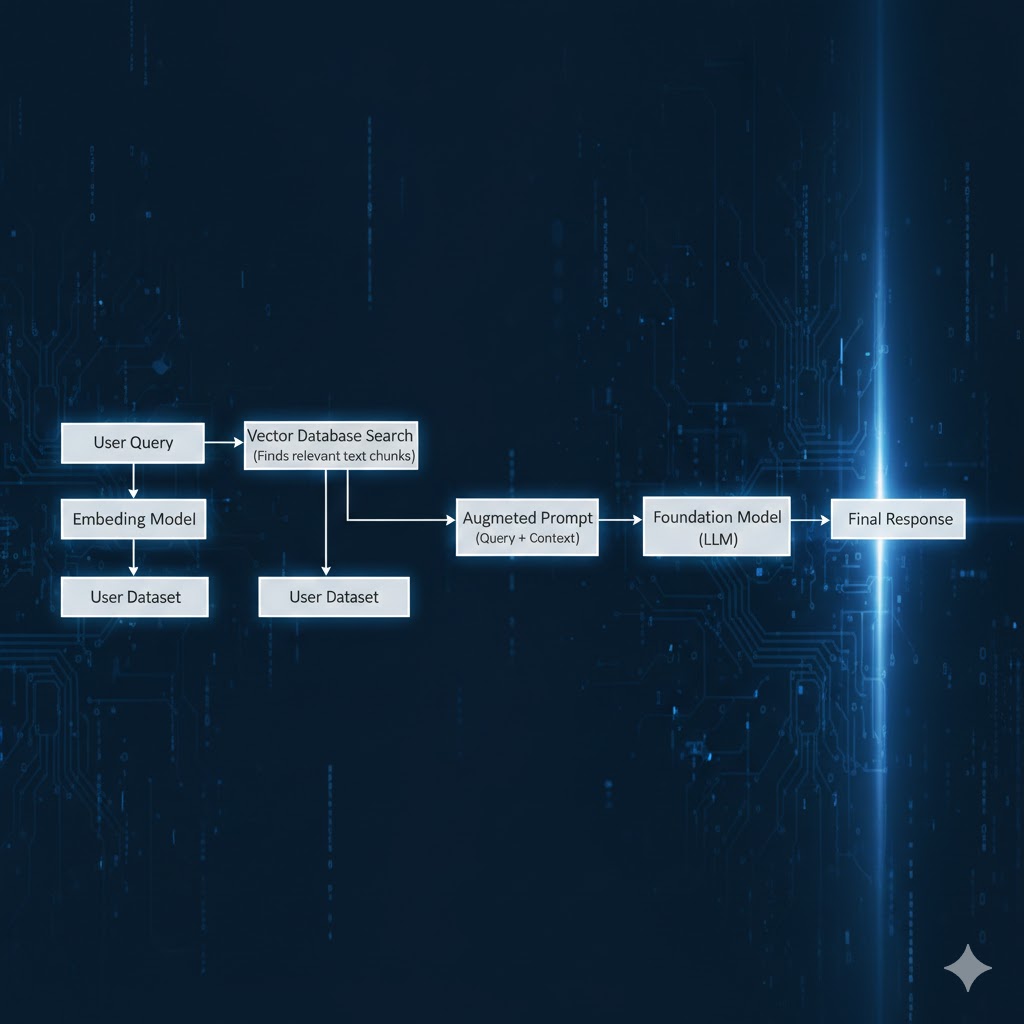
High-level RAG request flow (simplified)
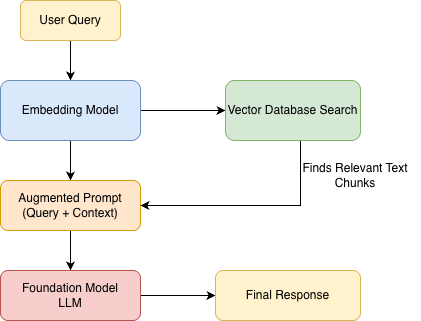
The Solutions Architecture Flow
- Ingestion: We break down enterprise documents, convert them into mathematical vectors (Embeddings), and store them in a Vector Database.
- Retrieval: When a user asks a question, we search the Vector DB for the most relevant facts.
- Augmentation: We send the user’s question plus those facts to the AI.
- Generation: The AI generates an answer grounded specifically in your provided data.
High-level Architecture flow (simplified)
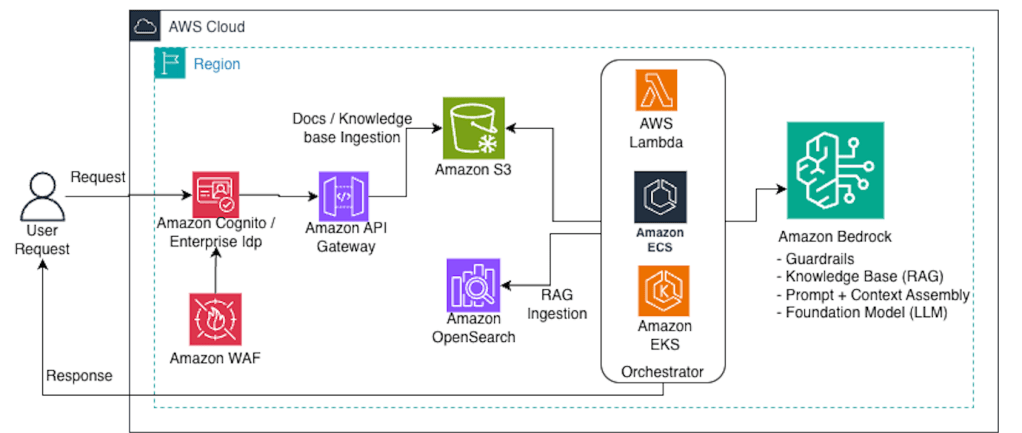
In an AWS-native implementation, services like Amazon Bedrock abstract away the underlying vector store and guardrail execution at inference time, while S3 and indexing pipelines remain part of the ingestion plane.
Cross-cutting on AWS:- Observability: CloudWatch + X-Ray- Secrets: Secrets Manager + KMS- Private connectivity: VPC endpoints / PrivateLink (where applicable)
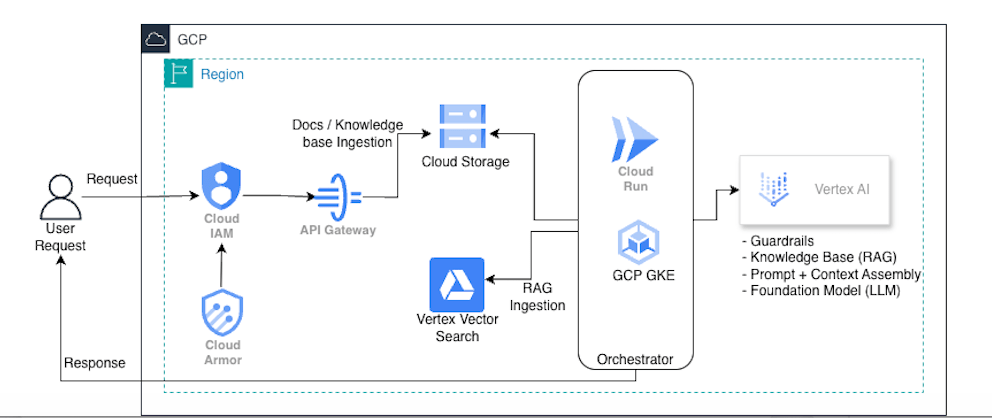
Cross-cutting on GCP:- Observability: Cloud Logging + Cloud Monitoring + Trace- Secrets: Secret Manager + KMS- Private connectivity: Private Service Connect (where applicable)
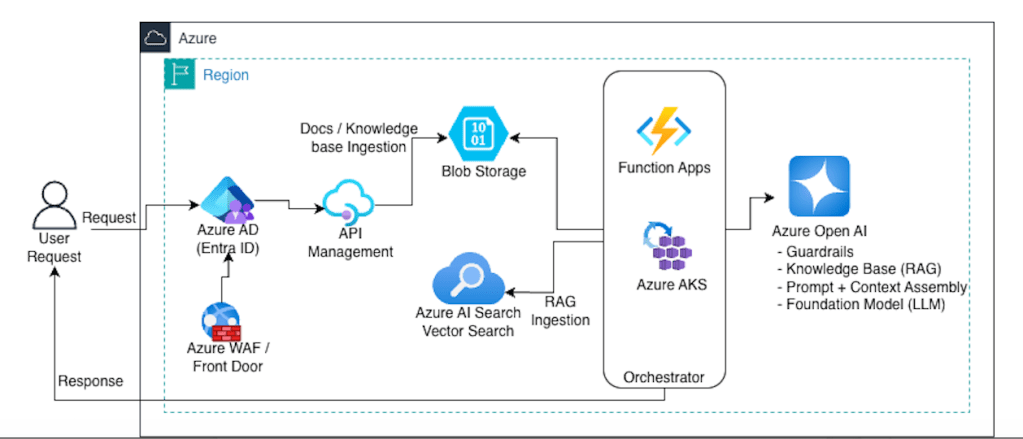
Cross-cutting on Azure:- Observability: Azure Monitor + App Insights- Secrets: Key Vault- Private connectivity: Private Endpoints
3. The “Security Sandwich” Pattern
In enterprise scenarios, the AI should not be exposed directly to the end-user. We design a “Security Sandwich” to ensure compliance and data privacy.
- The Input Layer (Guardrail): Checks for Prompt Injections (users trying to hack the AI’s logic) and PII Redaction (ensuring sensitive data doesn’t leave the network).
- The Core (LLM): The reasoning engine, ideally accessed via a Private Link to ensure traffic doesn’t traverse the public internet.
- The Output Layer (Guardrail): Performs Fact-Checking and Toxicity Filtering to ensure the response is accurate and compliant with company policy.
4. Multi-Cloud Service Mapping
A key task for any SA is selecting the right platform. Here is how the components map across the major cloud providers.
| Component | AWS | Azure | Google Cloud |
| Managed AI Platform | Amazon Bedrock | Azure AI Foundry | Vertex AI |
| Foundation Models | Claude 3.5, Llama, Titan | GPT-4o | Gemini 1.5 Pro |
| Vector Indexing | OpenSearch / Aurora | Azure AI Search | Vertex Vector Search |
| Governance Layer | Bedrock Guardrails | Azure Content Safety | Vertex Safety Filters |
| Compute/Logic | AWS Lambda | Azure Functions | Cloud Run / GKE |
5. Conclusion: Managing the Trade-offs
For a Solutions Architect, Gen AI is about managing the IQ-to-Cost ratio.
- Do you need a “High IQ” model (expensive) for a simple summarization task?
- Can you use a “Flash” model (cheap/fast) for 80% of your requests?
By focusing on RAG for data grounding and Guardrails for safety, you can build AI solutions that are not just impressive, but production-ready.
Architect’s Quick Glossary
- Token: The unit of billing (approx. 4 characters).
- Context Window: The “short-term memory” limit of the AI.
- Hallucination: When the AI provides a factually incorrect answer because it lacks context.
Deep Dive: Optimizing the “Day 2” Operations (Cost & Performance)
As a Solutions Architect, your job isn’t finished once the AI provides its first correct answer. In a production environment, you will face two primary enemies: Latency and Cost. Here is how to architect around them:
1. Implement a “Model Router”
Not every user request requires a “genius-level” model. Sending a simple “Hello” or a request for a 3-sentence summary to a top-tier model (like GPT-4o or Claude Opus) is an expensive architectural mistake.
- The Solution: Build a Router Logic layer. Use a lightweight, inexpensive model (like Gemini Flash or GPT-4o Mini) to classify the complexity of the request.
- The Result: You route 80% of tasks to “Small” models that cost pennies, saving the “Large” models for the 20% of tasks that actually require deep reasoning.
2. Semantic Caching for Instant Responses
In traditional web apps, we cache database queries. In Gen AI, we use Semantic Caching.
- The Problem: LLMs generate answers word-by-word, which is slow and costs money every single time.
- The Solution: Store previous User Queries and AI Responses in a Vector Database. When a new query comes in, check if it is mathematically similar to a previous one. If a user asks “How do I reset my password?” and another user asked the same thing 10 minutes ago, serve the cached answer instantly.
- The Value: This reduces your LLM API costs and provides a sub-second response time for common questions.
3. Moving from “Chat” to “Action” (Tool Use)
A chatbot that only talks is a “Knowledge Silo.” A production-ready solution should be Agentic.
- Architectural Shift: Instead of the AI just telling a user how to update their address, we use Function Calling. The LLM identifies the user’s intent and outputs a structured JSON object.
- The Integration: Your backend (AWS Lambda, Azure Functions) takes that JSON and calls your existing Enterprise APIs.
- The Goal: The AI becomes a natural language interface for your existing microservices, moving from a “Search Bot” to an “Action Bot.”
The Solutions Architect’s Gen AI Readiness Checklist
Before moving your Generative AI solution into production, run through this final architectural review to ensure your system is scalable, secure, and cost-effective.
🏗️ Architecture & Data
- [ ] RAG over Fine-Tuning: Have you confirmed that the model needs the “Open Book” (RAG) approach rather than permanent retraining?
- [ ] Chunking Strategy: Is your data broken down into logical pieces (chunks) that provide enough context without overwhelming the model?
- [ ] Vector Indexing: Is your Vector Database optimized with a refresh schedule to ensure the AI isn’t reading outdated “textbooks”?
🛡️ Security & Compliance
- [ ] The “Security Sandwich”: Are there active filters for both incoming prompts (Injection/PII) and outgoing responses (Hallucinations/Tone)?
- [ ] Data Residency: Does the chosen model provider comply with your region’s data laws (e.g., GDPR, HIPAA)?
- [ ] Network Isolation: Is the traffic between your application and the AI service traveling over a private backbone (Private Link/VPC) rather than the public internet?
💰 Cost & Performance
- [ ] Model Tiering: Are you using the smallest, fastest model capable of handling the specific task?
- [ ] Semantic Caching: Are you storing common answers in a cache to reduce API calls and latency?
- [ ] Streaming Enabled: Does the UI support streaming responses to improve the perceived speed for the end-user?
📈 Operations (LLMOps)
- [ ] Observability: Can you trace a single request from the user query through the vector search and back from the LLM?
- [ ] Human-in-the-Loop: Is there a mechanism for users to “rate” answers (Thumbs Up/Down) to help you improve the system over time?
- [ ] Version Control: Can you easily swap out one model for a newer version (e.g., moving from GPT-4o to GPT-5) without rewriting your entire backend?
Final Thought
Building with Gen AI is not about finding the “perfect prompt.” It’s about building a robust system around an unpredictable engine. By checking these boxes, you ensure that your solution is built on solid architectural principles rather than just “AI magic.”
How are you balancing performance vs. cost in your current AI designs? Let’s discuss in the comments.



Leave a Reply